
Introduzzjoni
The Kyocera Finecam L4V is a compact 4-megapixel digital camera designed for capturing high-quality images and video. It features a 3x optical zoom lens, a large 2.5-inch LCD screen, and various shooting modes to suit different photographic situations. This manual provides essential information for setting up, operating, maintaining, and troubleshooting your Finecam L4V camera.
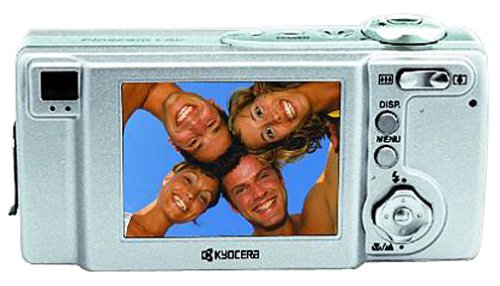
Figura 1: A silver Kyocera Finecam L4V digital camera, viewed from a slight angle, showing the lens, flash, and the 'Finecam L4v' branding on the front, and the battery/card compartment on the side.
Setup
1. Installazzjoni tal-batterija
The Finecam L4V operates using a CR-V3 lithium battery (included). For extended use and cost-effectiveness, two AA-sized rechargeable NiMH batteries are recommended as an alternative.
- Locate the battery compartment door on the side of the camera.
- Slide the latch to open the compartment.
- Insert the CR-V3 battery or two AA NiMH batteries, ensuring correct polarity (+/-) as indicated inside the compartment.
- Close the compartment door securely until it clicks into place.
2. Installazzjoni tal-Kard tal-Memorja
The camera uses Secure Digital (SD) or MultiMedia (MMC) memory cards for image and video storage. A 16 MB SD card is included with your camera.
- Open the battery/card compartment door.
- Insert the SD or MMC card into the designated slot with the metal contacts facing the correct direction (usually towards the front of the camera).
- Push the card gently until it locks into place. To remove, push the card in again, and it will spring out.
- Agħlaq il-bieba tal-kompartiment sew.
3. Konnessjoni ma' Kompjuter
To transfer images and videos, connect your Finecam L4V to a computer using the supplied USB cable.
- Kun żgur li l-kamera tkun mitfija.
- Connect one end of the USB cable to the camera's USB port.
- Connect the other end to an available USB 1.1 port on your Windows or Mac computer.
- Install the imaging software and USB drivers from the included CD-ROM if prompted by your operating system.
It-tħaddim tal-Kamera
1. Tixgħil / Mitfi
Press the power button (usually located on the top of the camera) to turn the camera on or off. The 2.5-inch LCD screen will activate upon power-on.
2. Teħid tar-Ritratti
- Inkwadru: Use the 2.5-inch LCD screen or the optical viewfinder biex tikkomponi r-ritratt tiegħek.
- Zoom: Use the zoom controls (typically a rocker switch near the shutter button) to adjust the 3x optical zoom and 4x digital zoom (for a total 12x zoom).
- Fokus: The camera features autofocus. Half-press the shutter button to focus, then fully press to capture the image.
- Modi ta' Sparar: Select from various modes such as macro for close-ups, landscape for wide scenes, and color modes (color, sepia, black & white) via the camera's menu.
- Modi tal-Flash: Adjust flash settings for different lighting conditions: auto flash, red-eye reduction auto flash, fill-in flash, flash-off, or night-time portrait.
3. Reġistrar Vidjows
The Finecam L4V supports AVI movie recording with sound for up to 120 seconds.
- Switch the camera to movie mode (refer to your camera's specific button or menu option).
- Agħfas il-buttuna tax-shutter biex tibda tirrekordja.
- Agħfas il-buttuna tax-shutter għal darb'oħra biex tieqaf tirrekordja.
4. Reġistrazzjoni tal-Vuċi
You can attach up to a 30-second voice message to each image. Consult the camera's on-screen menu for options to record and attach voice memos.
Manutenzjoni
- Tindif tal-Lenti: Uża drapp artab u mingħajr suf, iddisinjat speċifikament għal-lentijiet tal-kameras. Evita kimiċi ħarxa.
- Tindif tal-LCD Screen: Imsaħ l-iskrin bil-mod b'ċarruta tal-mikrofibra.
- Ħażna: When not in use, store the camera in a dry, dust-free environment, away from extreme temperatures. Remove batteries if storing for extended periods.
- Kura tal-batterija: If using rechargeable NiMH batteries, follow the manufacturer's charging instructions. Avoid overcharging.
Issolvi l-problemi
Kwistjonijiet Komuni u Soluzzjonijiet:
- Il-kamera ma tixgħelx:
- Kun żgur li l-batteriji huma mdaħħla sew bil-polarità xierqa.
- Check if batteries are fully charged or replace with fresh ones.
- If using a CR-V3 battery, note that it is not rechargeable and will need replacement when depleted. Consider using rechargeable AA NiMH batteries for long-term use.
- L-immaġnijiet huma mċajpra:
- Kun żgur li l-lenti tkun nadifa.
- Make sure the camera has focused correctly before fully pressing the shutter button.
- Iċċekkja l-kundizzjonijiet tad-dawl; uża l-flash jekk meħtieġ.
- Żball fil-karta tal-memorja:
- Kun żgur li l-karta tal-memorja hija mdaħħla sew.
- Try reformatting the card (this will erase all data, so back up first).
- Try a different compatible SD or MMC card.
- Cannot transfer photos to computer:
- Verify the USB cable is securely connected to both the camera and the computer.
- Kun żgur li l-kamera tkun mixgħula meta tkun imqabbda.
- Install the necessary drivers from the included CD-ROM.
- Ipprova port USB differenti fuq il-kompjuter tiegħek.
Speċifikazzjonijiet
| Karatteristika | Dettall |
|---|---|
| Isem tal-Mudell | Finecam L4V |
| Riżoluzzjoni Għadha Effettiva | 4 MP |
| Zoom ottiku | 3x |
| Zoom Diġitali | 4x |
| Daqs tal-Iskrin | 2.5 Pulzier |
| Tip tas-Sensor | CCD |
| Appoġġjati File Format | JPEG |
| Riżoluzzjoni tal-vidjo | 320 x 240 up to 120 sec |
| Tip ta' Memorja Flash | Karta SD/MMC |
| Tip ta 'batterija | CR-V3 Lithium (included), AA NiMH (recommended) |
| Teknoloġija tal-Konnettività | USB 1.1 |
| Piż tal-oġġett | 0.49 Liri (madwar 222g) |
| Dimensjonijiet (madwar) | 4.4 x 2.1 x 1.4 pulzieri (11.2 x 5.3 x 3.6 ċm) |
| Medda ISO | Awto, 100, 200, 400 |
| Veloċità Minima tax-Shutter | 8 sekonda |
| Veloċità Massima tax-Shutter | 1/2000 Sekonda |
| Aperture Modes | F2.8-F4.7 |
| Għandu Self-Timer | Iva |
Garanzija u Appoġġ
For information regarding warranty coverage, technical support, or service for your Kyocera Finecam L4V camera, please refer to the documentation included with your purchase or visit the official Kyocera support websit.
You can also visit the Kyocera brand store for additional product information: Kyocera Store on Amazon.