
VTech T2451
VTech t2451 2.4 GHz Analog Cordless Phone with Answering System and Caller ID User Manual
Mudell: T2451
Introduzzjoni
This manual provides comprehensive instructions for the setup, operation, and maintenance of your VTech t2451 2.4 GHz Analog Cordless Phone with Answering System and Caller ID. Please read this manual thoroughly before using your new phone system to ensure proper functionality and to take full advantage tal-karatteristiċi tiegħu.
Key features of your VTech t2451 include:
- 2.4 GHz analog reception for clear communication.
- Digital answering system with 3 mailboxes and 15 minutes of recording time.
- 50 name/number phonebook directory for easy contact management.
- 99 name/number Caller ID history to review sejħiet mitlufa.
- Headset compatibility (2.5 mm jack) for hands-free operation.
- Hold function, page/handset locator, and selectable ring tones.
- Disinn li jista' jitwaħħal mal-ħajt għal tqegħid flessibbli.
Setup
Follow these steps to set up your VTech t2451 cordless phone system.
- Spakkjar: Carefully remove all components from the packaging. Ensure you have the cordless handset, base unit, AC power adapter, telephone line cord, and battery pack.
- Installazzjoni tal-batterija: Open the battery compartment on the back of the cordless handset. Connect the battery pack connector to the jack inside the compartment, ensuring correct polarity. Place the battery pack into the compartment and close the cover.
- Konnessjoni tal-Unità Bażi:
- Connect one end of the telephone line cord to the TEL LINE jack on the base unit and the other end to a telephone wall jack.
- Connect the small end of the AC power adapter to the DC IN 9V jack on the base unit. Plug the large end of the AC power adapter into a standard electrical outlet.
- Iċċarġjar tal-idejn: Place the cordless handset in the base unit's charging cradle. The charge indicator on the handset should illuminate, indicating that the battery is charging. Allow the handset to charge for at least 12 hours before initial use.
- Immuntar tal-ħajt (Mhux obbligatorju): The base unit is designed to be wall-mountable. Refer to the included wall-mount bracket and instructions for secure installation.
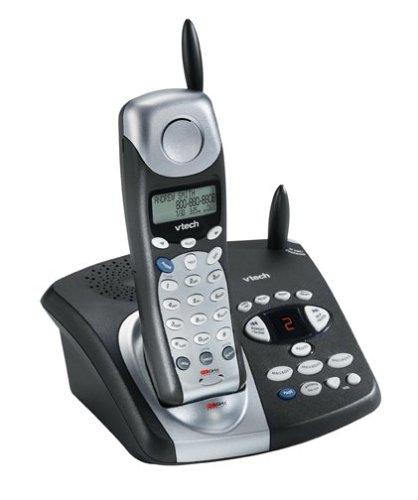
Image: The VTech t2451 cordless phone system, showing the black base unit with the silver and black handset docked in its charging cradle. The base unit features an integrated digital answering system with controls and a display.
Istruzzjonijiet Operattivi
Jagħmel u Jirċievi Sejħiet
- Biex Tagħmel Sejħa: Agħfas il- TALK button, wait for a dial tone, then dial the phone number.
- Biex Tirċievi Sejħa: Meta jdoqq it-telefon, agħfas il-buttuna TALK button or any key on the keypad (Any Key Answer).
- Biex Intemm Sejħa: Agħfas il- TMIEM jew poġġi l-handset lura fl-unità bażi.
- Funzjoni ta' Żomm: Waqt sejħa, agħfas ŻOMM button to place the call on hold. Press TALK mill-ġdid biex jerġa’ jibda s-sejħa.
Sistema ta' Tweġiba Diġitali
Your phone system includes a digital answering system with 3 mailboxes and 15 minutes of recording time.
- Daqq ta' Messaġġi: Agħfas il- PLAY button on the base unit to listen to new messages.
- Recording Outgoing Message (OGM): Follow the voice prompts to record a personalized outgoing message.
- Mailbox Management: The system supports up to 3 distinct mailboxes. Refer to the detailed instructions in the full user guide for setting up and accessing individual mailboxes.
ID ta' min iċempel u ktieb tat-telefon
- ID ta' min iċempel: When subscribed to Caller ID service, the handset display will show the caller's name and number. Press the CID buttuna biex terġaview the 99-name/number Caller ID history.
- Direttorju tal-ktieb tat-telefon: Store up to 50 names and numbers in the phonebook. Use the navigation buttons to scroll through entries and the MENU/AGĦŻEL button to add or edit entries.
Funzjonijiet Oħra
- Page/Handset Locator: Agħfas il- PAĠNA button on the base unit to locate a misplaced handset.
- Ringer Tones: Customize your phone's ringer by selecting from various available tones. Refer to the handset settings menu.
- Użu tal-Headset: Connect a 2.5 mm compatible headset to the headset jack on the side of the handset for hands-free communication.
Manutenzjoni
Proper care ensures the longevity of your VTech t2451 phone system.
- Tindif: Naddaf it-telefon u l-unità bażi b'drapp artab u nadif.amp drapp. Tużax kimiċi ħarxa jew tindif li joborxu.
- Kura tal-batterija:
- Always return the handset to the base unit when not in use to ensure it remains charged.
- Jekk it-telefon ma se jintużax għal perjodu twil ta' żmien, neħħi l-batterija mill-handset.
- Replace the battery when its performance significantly degrades. Use only the specified replacement battery pack.
- Kundizzjonijiet Ambjentali: Evita li tesponi t-telefon għal temperaturi estremi, dawl tax-xemx dirett, jew umdità.
Issolvi l-problemi
If you experience issues with your VTech t2451, try these common troubleshooting steps.
| Problema | Soluzzjoni |
|---|---|
| L-ebda ton tal-arloġġ. |
|
| Riċeviment ħażin jew statiku. |
|
| Il-mowbajl ma jiċċarġjax. |
|
| Is-sistema tat-tweġib tat-telefonati mhux qed tirreġistra l-messaġġi. |
|
Speċifikazzjonijiet
| Karatteristika | Dettall |
|---|---|
| Brand | VTech |
| Numru tal-Mudell | T2451 |
| Tip tat-Telefon | Bla fili |
| Frekwenza | 2.4 GHz Analog |
| Tip ta' Sistema ta' Tweġiba | Diġitali |
| Kapaċità ta 'Reġistrazzjoni | minuti 15 |
| Mailboxes | 3 |
| Phonebook Directory | 50 names/numbers |
| Memorja tal-ID tas-Sejjieħ | 99 names/numbers |
| Kompatibilità tal-headset | 2.5 mm jack |
| Sors tal-Enerġija | Corded Elettriku |
| Dimensjonijiet tal-Prodott | 7.1 x 8.5 x 5.1 pulzieri |
| Piż tal-oġġett | 2.19 liri |
| Manifattur | Vtech |
Garanzija u Appoġġ
For warranty information, please refer to the warranty card included with your product packaging or visit the official VTech website. VTech provides customer support for product inquiries, technical assistance, and service. Contact information can typically be found on the VTech webis-sit jew fid-dokumentazzjoni oriġinali tal-prodott.
Manifattur: VTech
Ask a question about this manual
Ask about setup, troubleshooting, compatibility, parts, safety, or missing instructions. Manuals+ will review the question and use this page’s manual context to help answer it.