
1. Introduzzjoni
This manual provides instructions for the setup, operation, and maintenance of your Bose MediaMate Computer Speakers. These speakers are designed to enhance the audio experience for your computer, whether for music, movies, or gaming. The compact design and upward-angled sound projection optimize audio delivery for desktop use, occupying minimal desk space.
2. Informazzjoni dwar is-Sigurtà
Please read and follow all safety instructions before using this product to prevent electric shock, fire, or injury. Keep this manual for future reference.
- Do not expose the speakers to water or moisture.
- Tpoġġix l-ispikers ħdejn sorsi ta’ sħana bħal radjaturi, reġistri tas-sħana, stufi, jew apparat ieħor (inkluż amplifiers) li jipproduċu sħana.
- Uża biss aċċessorji/aċċessorji speċifikati mill-manifattur.
- Aqla’ dan l-apparat waqt maltempati tas-sajjetti jew meta ma jintużax għal perjodi twal ta’ żmien.
- Irreferi l-manutenzjoni kollha lil persunal tas-servizz kwalifikat. Is-servizz huwa meħtieġ meta l-apparat ikun ġie bil-ħsara b'xi mod, bħal korda tal-provvista tal-enerġija jew plagg ikun bil-ħsara, likwidu jkun inxtered jew oġġetti jkunu waqgħu fl-apparat, l-apparat ikun ġie espost għax-xita jew umdità, ma jaħdimx b'mod normali , jew twaqqgħet.
3. Kontenut tal-Pakkett
Ivverifika li l-oġġetti kollha huma preżenti fil-pakkett tiegħek:
- Bose MediaMate Computer Speakers (2 units)
- Adapter tal-Enerġija
- Audio Cable (3.5mm stereo jack)
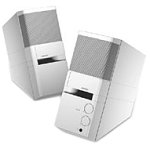
Image: The Bose MediaMate Computer Speakers in Gray. The image shows two compact speakers, one with visible volume and mix controls, and a headphone jack.
4. Setup
Follow these steps to set up your Bose MediaMate Computer Speakers:
- Pjazzament: Place the speakers on a flat, stable surface on either side of your computer monitor. Ensure they are angled slightly upward towards your listening position for optimal sound.
- Qabbad il-Kejbil tal-Awdjo: Connect the 3.5mm audio cable from the back of the primary speaker (the one with controls) to the audio output jack on your computer.
- Qabbad l-Enerġija: Plug the power adapter into the power input on the primary speaker, then plug the adapter into a wall outlet.
- Qawwa Mixgħul: Turn on the speakers using the volume knob. The power indicator light should illuminate.
5. Istruzzjonijiet Operattivi
Once set up, operating your MediaMate speakers is straightforward:
- Kontroll tal-Volum: Use the large knob labeled "VOLUME" on the front of the primary speaker to adjust the overall sound level.
- Kontroll tat-Taħlita: The "MIX" knob allows you to blend audio from two different sources if you have a second device connected to the auxiliary input.
- Jack tal-headphone: For private listening, plug your headphones into the headphone jack located on the front of the primary speaker. This will mute the speakers.
- Inputs Doppju: The speakers feature dual inputs, allowing you to connect and mix two audio sources simultaneously. For example, you can connect your computer and a portable music player.
6. Manutenzjoni
To ensure the longevity and optimal performance of your speakers:
- Tindif: Use a soft, dry cloth to clean the exterior surfaces of the speakers. Do not use liquid cleaners or aerosols.
- Trab: Regularly dust the speaker grilles to prevent accumulation that could affect sound quality.
- Ħażna: Jekk se taħżen l-ispikers għal perjodu estiż, skonnettjahom mill-provvista tal-enerġija u aħżenhom f'post frisk u niexef.
7 Issolvi l-problemi
If you encounter issues with your Bose MediaMate speakers, refer to the following common problems and solutions:
| Problema | Kawża Possibbli | Soluzzjoni |
|---|---|---|
| L-ebda ħoss |
|
|
| Ħoss distort |
|
|
| Kelliem wieħed biss jaħdem |
|
|
8. Speċifikazzjonijiet
- Ditta: Bose
- Mudell: MediaMate
- Konnettività: 3.5mm Audio Input, AC Power
- Output Awdjo: Stereo
- Tip ta' Kelliem: Multimedia
- Materjal: Metall
- Daqs tal-Kelliem: 6 Centimeters (Audio Driver)
- Piż tal-oġġett: 3 Liri
- Kulur: Griż
9. Garanzija u Appoġġ
Bose MediaMate Computer Speakers come with a limited warranty. For specific warranty details and duration, please refer to the warranty card included with your product or visit the official Bose websit.
For technical support, product registration, or service inquiries, please contact Bose customer service:
- Telefon: 800-444-2673
- Websit: www.bose.com
Please have your product model number (MediaMate) and purchase date available when contacting support.