
1. Introduzzjoni
This manual provides essential information for the safe and efficient operation of your Crosley WR18 Mini Bubbler Jukebox. Please read these instructions thoroughly before using the unit and retain them for future reference.
The Crosley WR18 is a reproduction of a 1946-style jukebox, featuring percolating bubble tubes, neon lights, a front-loading compact disc player, FM radio, and stereo speakers. It is operated primarily via a 12-button remote control.
2. Istruzzjonijiet tas-Sigurtà
- Tesponix l-unità għax-xita jew l-umdità.
- Timblokka l-ebda fetħiet tal-ventilazzjoni.
- Kun żgur li l-unità titqiegħed fuq wiċċ stabbli u livell.
- Aqla 'l-unità waqt maltempati tas-sajjetti jew meta ma tintużax għal perjodi twal.
- Irreferi l-manutenzjoni kollha lil persunal tas-servizz kwalifikat.
3. Setup
3.1 Spakkjar u Tqegħid
Carefully remove the jukebox from its packaging. Place the unit on a flat, stable surface away from direct sunlight, heat sources, and excessive dust or moisture. Ensure there is adequate space around the unit for ventilation.
3.2 Konnessjoni tal-Enerġija
Connect the AC power cord to the power input on the back of the unit, then plug it into a standard wall outlet. The unit is designed for 120V AC, 60Hz power supply.
3.3 Setup tal-Kontroll mill-Bogħod
Insert two AAA batteries (not included) into the remote control, observing the correct polarity. The remote control is essential for operating most functions of the jukebox.
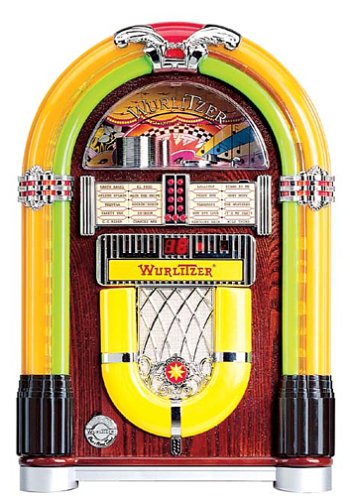
Figura 1: Quddiem view of the Crosley WR18 Mini Bubbler Jukebox. This image shows the main unit with its distinctive bubble tubes, neon lights, and speaker grilles. The CD player slot is visible below the main display area.
4. Istruzzjonijiet Operattivi
4.1 Power On/Off
Agħfas il- QAWWA buttuna fuq il-kontroll remot biex tixgħel jew titfi l-unità.
4.2 Tħaddim tas-CD Player
- Agħfas il- CD button on the remote to select CD mode.
- Agħfas il- FTUĦ/MAGĦLUQ button on the remote to open the CD tray.
- Place a compact disc, label side up, into the tray.
- Agħfas FTUĦ/MAGĦLUQ again to close the tray. The unit will begin reading the disc.
- Uża l- DĦABBA/PAWŻA buttuna biex tibda jew tieqaf daqq.
- Uża l- SALTA QUDDIEM (|>>) jew SKIP LURA (<<|) buttuni biex tinnaviga bejn it-traċċi.
- Il- PROGRAMM function allows you to create a custom playback order for tracks. Refer to the remote control diagram for specific programming steps.
- Il- IRREpeti function allows you to repeat the current track or the entire disc.
4.3 Tħaddim tar-Radju FM
- Agħfas il- FM button on the remote to select FM radio mode.
- Extend the external FM antenna located at the back of the unit for optimal reception. Adjust its position for clearer sound.
- Uża l- IXTONJA (+) jew INTXONA (-) buttons on the remote to manually tune to desired radio stations.
4.4 Kontroll tal-Volum
Aġġusta l-volum billi tuża VOLUME UP (+) u VOLUM NIŻEL (-) buttons on the remote control. Note that all volume adjustments are made via the remote.
4.5 Neon Lights and Bubble Tubes
The genuine multicolored neon lights and percolating bubble tubes activate automatically when the unit is powered on, enhancing the retro aesthetic. There are no separate controls for these features.
5. Manutenzjoni
5.1 Tindif tal-Kabinett
Wipe the handcrafted hardwood cabinet with a soft, dry cloth. For stubborn marks, a slightly damp Jista' jintuża drapp, segwit minn tnixxif immedjat. Evita prodotti tat-tindif jew solventi li joborxu.
5.2 Kura tas-CD Player
To ensure optimal performance, keep the CD tray and lens clean. Use a specialized CD lens cleaner disc periodically. Avoid touching the CD lens directly.
5.3 Bubble Tubes and Neon Lights
The bubble tubes and neon lights are sealed units and require no user maintenance. If any issues arise with these components, contact customer support.
6 Issolvi l-problemi
| Problema | Kawża Possibbli | Soluzzjoni |
|---|---|---|
| Ebda qawwa | Il-korda tal-enerġija mhux imqabbda; is-sokit mhux attiv | Ensure power cord is securely plugged in; test outlet with another device. |
| L-ebda ħoss | Volume too low; incorrect mode selected | Increase volume using remote; ensure correct mode (CD/FM) is selected. |
| Is-CD mhux qed idoqq | Disc inserted incorrectly; disc dirty/scratched; CD mode not selected | Reinsert disc correctly; clean disc; select CD mode. |
| Akkoljenza fqira tal-FM | Antenna not extended/positioned correctly | Fully extend and adjust the external FM antenna. |
| Il-kontroll mill-bogħod ma jaħdimx | Batteries depleted; line of sight blocked; remote malfunction | Replace batteries; ensure no obstructions between remote and unit; if remote remains unresponsive, contact customer support as many functions are remote-only. |
7. Speċifikazzjonijiet
- Numru tal-Mudell: WR18
- Dimensjonijiet tal-Prodott: 12 x 22 x 16 inches (Width x Height x Depth)
- Piż tal-oġġett: 16.8 liri
- Manifattur: Radju Crosley
- Features Awdjo: Stereo sound with two 4-inch speakers and built-in ampaktar ħaj
- Daqq tal-Midja: CD player with program and repeat functions, FM radio with external antenna
- Karatteristiċi Estetiċi: Handcrafted hardwood cabinet, genuine multicolored neon lights, bubble tube accents
- Kontroll: 12-button mini jukebox remote control
8. Garanzija u Appoġġ
The Crosley WR18 Mini Bubbler Jukebox typically comes with a manufacturer's warranty. Based on user reports, the Crosley warranty period is 90 days. Please note that for warranty service, you may be responsible for shipping the unit back to the manufacturer and an additional fee for return shipping and handling after repair.
For technical support, warranty claims, or service inquiries, please contact Crosley Radio customer service directly. Refer to the contact information provided with your product packaging or visit the official Crosley webis-sit għad-dettalji ta' appoġġ l-aktar aġġornati.