
Introduzzjoni
The Vivitar 450PZ is a compact 35mm camera designed for ease of use, featuring fully automatic operation. This manual provides essential information for setting up, operating, maintaining, and troubleshooting your camera to ensure optimal performance.
The camera incorporates automatic focusing and exposure, a 38 to 70mm zoom lens, an automatic flash with red-eye reduction, and motorized film handling. An electronic self-timer is also included for convenience.
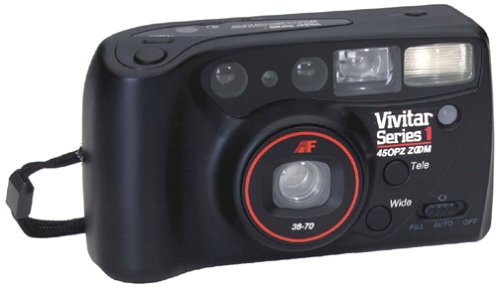
Immaġni: Quddiem view of the Vivitar 450PZ 35mm Camera, showcasing id-disinn kompatt u l-lenti tiegħu.
Setup
1. Installazzjoni tal-batterija
- Locate the battery compartment cover on the camera body.
- Iftaħ l-għatu billi tiżżerżaqh jew tgħollih skont l-indikatur.
- Insert the required CR123A type batteries, ensuring correct polarity (+/-) as indicated inside the compartment.
- Agħlaq l-għatu tal-kompartiment tal-batterija sew.
2. Tagħbija tal-Film
- Open the camera back by sliding the latch.
- Place a 35mm film cartridge into the film chamber.
- Pull the film leader across to the film take-up spool, aligning it with the start mark.
- Close the camera back. The camera will automatically advance the film to the first frame.
3. Wrist Strap Attachment
Attach the provided wrist strap to the designated loop on the camera body. This helps prevent accidental drops and provides a secure grip during use.
It-tħaddim tal-Kamera
1. Power On/Off
Locate the power button or switch, typically near the shutter button. Press or slide it to turn the camera on or off.
2. Tieħu Ritratti
- Ħares permezz tal- viewfinder biex tikkomponi r-ritratt tiegħek.
- Press the shutter button halfway down to activate the autofocus and exposure systems. The camera will automatically set the focus and exposure.
- Press the shutter button fully down to take the picture. The film will automatically advance to the next frame.
3. Funzjoni taż-Żum
Use the zoom control (usually a lever or buttons near the shutter) to adjust the focal length between 38mm (wide-angle) and 70mm (telephoto). This allows you to bring subjects closer or capture a wider scene.
4. Tħaddim tal-Flash
- Automatic Flash: The flash will automatically fire in dimly lit conditions to ensure proper exposure.
- Tnaqqis tal-Għajnejn Ħomor: When activated, the camera emits a series of pre-flashes before the main flash to reduce the red-eye effect in portraits.
- Flash Off Mode: For situations where flash is not desired (e.g., museums, theater), locate the flash mode button and select the 'flash off' setting.
5. Self-Timer
To use the self-timer, press the self-timer button. A flashing LED indicator will typically signal the countdown. After a set delay (e.g., 10 seconds), the camera will automatically take the picture, allowing the photographer to be included in the shot.
6. Irriwrinġar tal-Film
When the film roll is complete, the camera will automatically rewind the film back into the cartridge. A mid-roll rewind function may also be available, allowing you to rewind the film before the roll is finished by pressing a specific button (refer to camera markings if available).
Manutenzjoni
Tindif tal-Kamera
- Uża drapp artab u mingħajr suf biex timsaħ bil-mod il-korp tal-kamera.
- For the lens, use a specialized lens cleaning cloth and lens cleaning solution. Avoid touching the lens surface with your fingers.
- Do not use abrasive cleaners or solvents, as these can damage the camera's finish and optical components.
Ħażna
- Meta ma tkunx qed tuża l-kamera, aħżenha f'post frisk u niexef 'il bogħod mix-xemx diretta u minn temperaturi estremi.
- Neħħi l-batteriji jekk il-kamera ma tkunx se tintuża għal perjodu estiż biex tevita t-tnixxija.
Issolvi l-problemi
Kamera Mhux Tixgħel
- Iċċekkja jekk il-batteriji humiex imdaħħla sew bil-polarità xierqa.
- Ibdel il-batteriji qodma jew eżawriti b'oħrajn ġodda.
- Kun żgur li s-swiċċ tal-enerġija jkun fil-pożizzjoni 'On'.
Film Not Advancing
- Verify that the film is correctly loaded and the leader is engaged with the take-up spool.
- Check if the film door is securely closed.
- Ensure there is enough power from the batteries for the motor to operate.
Il-flash mhux qed jaħraq
- Confirm that the flash is not set to 'Flash Off' mode.
- Allow sufficient time for the flash to charge (indicated by a flash ready lamp).
- Ensure ambient light conditions are dark enough for the automatic flash to activate.
Speċifikazzjonijiet
| Karatteristika | Dettall |
|---|---|
| Brand | Vivitar |
| Isem tal-Mudell | 450PZ |
| Tip ta' Format tal-Film | 35mm |
| Lenti | 38-70mm Zoom |
| Kontroll tal-espożizzjoni | Awtomatiku |
| Sistema ta 'Fokus | 14-zone Autofocus |
| Flash | Automatic with Red-Eye Reduction |
| Immaniġġjar tal-Films | Motorized Loading, Advance, and Rewind |
| Karatteristiċi Speċjali | Built-In Flash, Compact Design, Electronic Self-Timer |
| Piż tal-oġġett | 15.2 uqija |
| Komponenti Inklużi | Korp tal-Kamera u Lenti |
Garanzija u Appoġġ
Informazzjoni dwar Garanzija
The Vivitar 450PZ camera comes with a warranty covering one year on parts and 90 days on labor from the date of purchase. Please retain your proof of purchase for warranty claims.
Appoġġ għall-Klijent
For technical assistance, service, or further inquiries regarding your Vivitar 450PZ camera, please refer to the contact information provided with your product packaging or visit the official Vivitar websit għal riżorsi ta' appoġġ.